Kubernetes and Docker Keep Getting Mentioned Together: Here is What Each One Does
If you are just starting your journey into cloud computing or DevOps, you have probably noticed that Docker and Kubernetes are almost always mentioned in the same conversation. It can make them sound like two versions of the same technology that do exactly the same job. Well, they don’t.
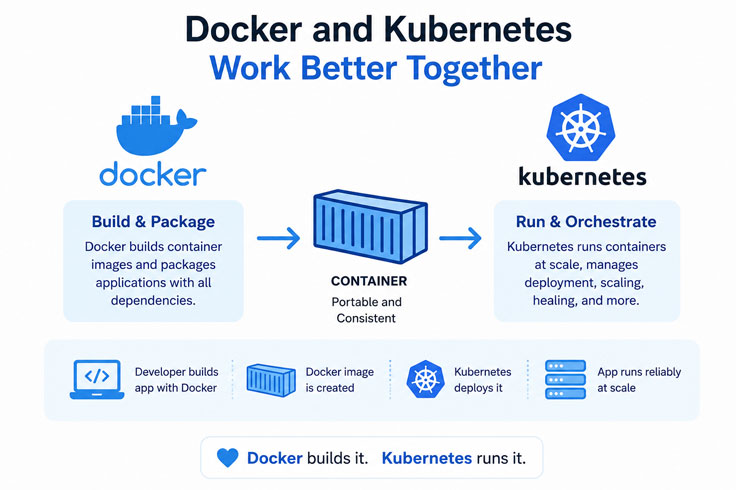
While they work incredibly well together, Docker and Kubernetes solve different problems. While one helps you package an application so it runs consistently everywhere, the other helps you manage hundreds of those applications once they are deployed. You need to understand the difference early to learn cloud technologies.
Why Were Docker and Kubernetes Created?
Deploying software was often frustrating before Docker existed. A developer will build an application on a laptop and test it thoroughly, and everything will work perfectly. Then the same application would be deployed to a server, and all of a sudden, something would break.
Maybe the server had a different operating system. Maybe a required library was missing. Probably, the software versions did not match. Whatever the reason, the result was the same: it worked on my machine.
This is one of the biggest challenges in software development. Containers solved this problem by packaging the application together with everything it needs to run, like runtime, dependencies, libraries, and configuration.
This is where Docker entered the picture. As companies started running hundreds of containers, another challenge was already there how would you manage all of them in an efficient manner?
This is where Kubernetes comes in.
What is Docker?
Docker is an open-source containerization platform. It allows developers to package applications into lightweight containers. Contrary to virtual machines, Docker containers do not need a complete operating system for each application. They share the host system’s kernel and make it much faster.
A typical Docker workflow is straightforward. You write a Dockerfile that has instructions to build your application. Docker converts those instructions into an image. That image can be started as a container on any system that supports Docker. This simple workflow eliminates countless deployment issues. Consistency is one of the biggest strengths.
What is Kubernetes?
While Docker makes running containers easy, Kubernetes makes running large numbers of containers manageable. As applications grow, they are often divided into many smaller services called microservices. Each service runs inside one or more containers. Suddenly, instead of managing five containers, you are managing hundreds.
Doing this manually simply is not practical. Kubernetes is a container orchestration platform that is designed to automate the entire process. It decides where containers should run and monitors their health. It restarts failed containers and also distributes traffic between healthy ones while scaling applications automatically when demand increases.
Understanding Kubernetes Architecture
You do not need to memorize every Kubernetes component on day one. But you need to understand three core concepts. This helps:
Control Plane
This is the brain of the Kubernetes cluster. It checks whether everything is running as expected and makes decisions whenever changes are needed.
Nodes
Nodes are the machines where applications actually run. These can be physical servers or virtual machines located in the cloud.
Pods
Pods are the smallest deployable units in Kubernetes. A pod generally has one application container, although it can contain various containers that need to work closely together. Interestingly, if a pod crashes, Kubernetes simply creates another one automatically. From a user’s perspective, the application keeps running without interruption.
The Difference Between Docker and Kubernetes
Let’s understand how Kubernetes works with Docker. Docker creates and runs containers, and Kubernetes manages containers after they are deployed. Both are essential, and they work so well together. A common misconception among beginners is that they must choose one or the other. In reality, modern companies use both. Docker handles everything before deployment. Developers write Docker files, build images, and test applications locally and ensure everything works correctly. Once the application is ready, Kubernetes takes over. You need to understand the difference between Kubernetes and Docker.
It deploys Docker containers across various servers and monitors them continuously while scaling them during high traffic and replacing failed containers automatically. Each tool focuses on what it does best.
Many beginners ask whether they should learn Kubernetes first because it is considered more advanced. Well, the better approach is to start with Docker. Once you have built a few Docker images, run containers locally, connected various containers together, and, at the same time, understood how container networking works, Kubernetes suddenly feels much more logical.
Kubernetes can seem overwhelming without Docker knowledge.
Career Opportunities
Docker and Kubernetes are core technologies in cloud computing. Companies building applications on cloud platforms expect engineers to understand containerization and orchestration. These skills are extremely valuable for careers like DevOps Engineer, Cloud Engineer, Platform Engineer, Site Reliability Engineer, and Backend Software Developer, to name a few.
Even developers who are not working directly in DevOps could benefit from understanding containers because modern software development relies on them every day.
Learn Docker and Kubernetes at VTechLabs
Learning these technologies from documentation alone might feel overwhelming. The fastest way to build confidence is through practical projects, which is where you create Docker containers, deploy applications, and manage them with Kubernetes.
VTechLabs, the best software training institute, offers hands-on training in Vadodara; the training introduces Docker first before moving into Kubernetes and ensures you understand not just how these tools work but why they are used together in real-world environments.
Whether you are preparing for a DevOps role, a cloud engineering career, or just want to strengthen your software development skills, build a solid foundation in Docker and Kubernetes; it is an investment that continues to pay off as cloud technologies evolve.
back to blog